Experian's powerful intuitive address validation tool uses data from over 245 countries to deliver validated, formatted and enriched addresses. Our solution for the Microsoft Power Platform offers multiple ways of performing address validation:
The workflow for each of these approaches is detailed in the tabs below.
Our Autocomplete search type is designed to provide accurate suggestions in real-time, that continually update as the user types. The user should provide the address elements in the order that they would appear on an envelope.
The user starts to type into the first address field. Suggestions will be displayed in a dropdown.
The user can then either:
When a selection is made, the final address is displayed in the fields configured on the form.
From v4.5.0 of the app, if you're searching in the United Kingdom you have the option of typing in either a regular postal address or a what3words 3 word address.
United Kingdom only
The user selects the first address field and a country dropdown appears within the field with the default country automatically selected. Country selection is detailed in the Autocomplete tab.
Providing the chosen country is the United Kingdom, the user starts typing a what3word address into the single text box. Once a partial 3 word address is detected from the first letter of the third word, a list of matching 3 word addresses is displayed.
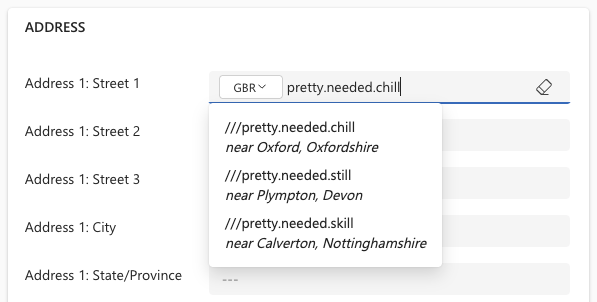
The user can then select one of the what3words addresses to trigger a search for all postal addresses within a 100m radius of the what3words address.
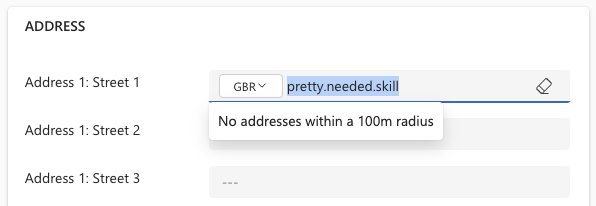
Either no addresses are found:
Or a picklist of postal addresses is displayed:
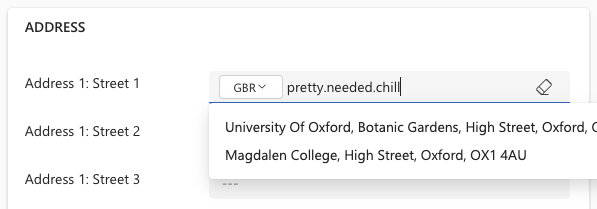
The user then selects an address from the list. This address will automatically be formatted in the correct fields configured on the form.
If enrichment data has been set up to include the what3words dataset the configured data will be retrieved and mapped to the chosen object fields. This could include the what3words address itself or the latitude and longitude for the what3word address.
Additional license for what3words Enrichment dataset